How to add App to Home screen
Depending on your Device:
For iPhone/iPad:
1. Open Safari browser
2. Enter in URL and go to bottom of the screen,
3. Select the icon in the middle 
4. Scroll down and select "Add to Home Screen".
For Android:
1. Open any browser
2. Select Menu (Top Right Corner), then Select "Home screen" and follow the steps OR
Select Menu (Bottom Right Corner), Select Add Page to and follow the steps
Desktop:
1. Open the App from any browser.
2. Resize your browser screen so you can see the same browser and your desktop on the same screen.
3. Left click the icon located to the left side of your URL in the address bar
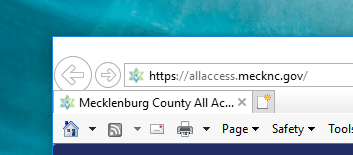 :
:
4. Continue to hold down the mouse button and drag the icon to your desktop.